
Online medical intake is the process of securely entering your personal, medical, and insurance information through a digital form before a telehealth consultation. The industry standard term for this process is "digital patient intake," and it replaces the paper-based forms you would traditionally fill out in a waiting room. Knowing how to complete online medical intake correctly saves time, reduces errors, and gives your clinician everything needed to focus on your health from the first minute of your visit. Digital intake takes under 10 minutes for new patients, compared to 45 minutes with paper forms. That difference alone makes the process worth understanding thoroughly.
How to complete online medical intake: what you need first
Before you open a single form, gather the right materials. Starting without them is the most common reason patients abandon intake forms midway and risk delaying their appointments.
Here is what to have ready before you begin filling out online medical forms:
- Full legal name and date of birth. These must match your insurance records exactly.
- Medical history. Include past diagnoses, surgeries, hospitalizations, and chronic conditions. Write these down in advance so you are not guessing during the form.
- Current medications with dosages. Specific fields covering medications account for the majority of clinical verification needs and reduce errors significantly. List every prescription, over-the-counter drug, and supplement.
- Insurance card. Have it physically in hand. You will need the carrier name, group number, member ID, and subscriber name. Photographing your insurance card before starting is the single most effective way to avoid errors in the insurance section.
- Emergency contact information. Name, relationship, and phone number.
- A device with internet access. A smartphone, tablet, or computer all work. Most modern intake platforms are mobile-optimized.
Before submitting any health data online, confirm the platform uses a signed Business Associate Agreement (BAA) between the clinic and its software vendor. A BAA confirms HIPAA compliance, meaning your data is handled according to federal privacy law. Reputable telehealth platforms like Renewmd display this information clearly.
Pro Tip: Use a private, password-protected Wi-Fi network when completing intake forms. Public networks in coffee shops or airports create unnecessary security exposure for sensitive health data.

What are the steps for online medical intake?
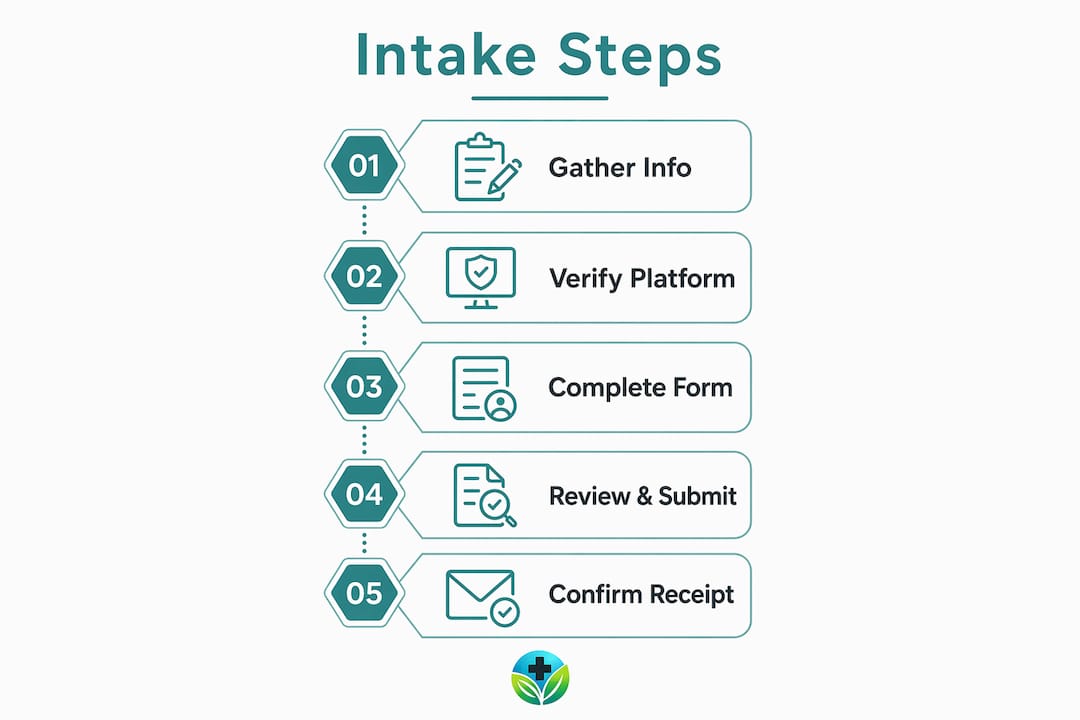
The steps for online medical intake follow a consistent sequence across most telehealth platforms. Understanding the flow before you start removes any uncertainty.
-
Receive your form link. Most platforms send an automated SMS or email link 24–72 hours before your appointment. Check both your inbox and spam folder if you do not see it within a few hours of booking.
-
Open the link on your device. The form opens directly in your browser. No app download is required on most platforms. The layout is typically single-column and mobile-optimized, meaning it reads cleanly on a phone screen.
-
Complete the personal information section. Enter your full legal name, date of birth, address, and contact details. Double-check that your name matches your insurance card exactly.
-
Add emergency contacts. Provide at least one contact with a valid phone number. Some platforms require a relationship designation such as spouse, parent, or friend.
-
Enter your insurance details. Use your photographed insurance card here. Enter the carrier name, group number, member ID, and subscriber name with no shortcuts or abbreviations.
-
Complete your medical and medication history. Work through this section methodically. List every condition, surgery, and medication. If a condition is ongoing, note that clearly.
-
Review and sign consent forms. Most intake forms include a HIPAA authorization, a consent to treat, and a telehealth-specific consent. Read each one before signing. These are legally binding documents.
-
Upload any supporting documents. Some platforms allow you to attach lab results, prior authorization letters, or physician notes. Use this option when available. It gives your clinician more context before the visit.
-
Submit the form and save your confirmation. After submission, you should receive a confirmation message by email or on-screen. Screenshot or save this confirmation. It is your proof that intake is complete.
Pro Tip: Before hitting submit, read through every section once more. A mistyped date of birth or wrong group number can delay insurance verification and push back your appointment.
Preparing your telehealth visit in advance using these steps puts your clinician in the best position to help you from the moment the call begins.
Common mistakes when filling out online medical forms
Even well-prepared patients run into problems. Knowing where the friction points are helps you move past them without frustration.
-
Conditional logic confusion. Many intake platforms use conditional logic to show or hide questions based on your previous answers. If you skip a question or enter incomplete information in an early section, the form may display unexpected follow-up questions or block your progress entirely. Always answer every visible question before moving forward.
-
Insurance field errors. The insurance section is where most errors occur. A transposed digit in a member ID or a misspelled carrier name can fail eligibility verification. Use your physical card, not your memory.
-
Leaving the form too late. Save-and-return features exist on many platforms, but waiting until the last minute creates real risk. Most systems require completed intake before they trigger appointment confirmation. If you miss that window, your slot may not be secured.
-
Browser or device compatibility issues. Older browsers like Internet Explorer do not render modern intake forms correctly. Use Google Chrome, Safari, or Mozilla Firefox. If a form fails to load, try a different browser before contacting support.
-
Overwhelming medical history sections. Long medication or condition lists can feel like a lot to enter at once. Use the save-and-return feature to fill large sections gradually. Complete the form at least 24 hours before your appointment to leave time for any technical issues.
If you get stuck at any point, contact the clinic's support line or chat function before your appointment window closes. Most telehealth platforms have dedicated patient support teams who can reset form access or extend deadlines.
Pro Tip: Keep a running notes document on your phone with your current medications, dosages, and key medical history. Updating it after each doctor visit means you will always have accurate information ready for any intake form.
How does completed intake improve your telehealth visit?
Accurate, timely intake submission changes the quality of your telehealth consultation in measurable ways. The benefits extend beyond convenience.
| Benefit | What it means for you |
|---|---|
| Clinician arrives prepared | Your provider reviews your history before the call, not during it |
| Reduced appointment anxiety | 84% of patients report that long waits negatively affect their care experience; completed intake reduces that bottleneck |
| Faster insurance verification | Accurate insurance fields allow eligibility checks to run before the visit |
| More time on health issues | Administrative questions are answered in advance, so the call focuses on your care |
| Fewer data entry errors | Digital forms with validation fields catch mistakes that paper forms miss |
Digital intake forms enable providers to start telehealth visits with patient information already loaded, which directly reduces delays and lets the clinical conversation begin immediately. For weight management consultations specifically, this matters because your clinician needs a clear picture of your medication history, metabolic conditions, and current health status before recommending treatments like Semaglutide or Tirzepatide.
Viewing intake as a collaborative health tool rather than a paperwork chore shifts the experience entirely. The form is your first contribution to the clinical conversation.
The clinical intake process is where your care plan begins. A thorough, accurate submission gives your clinician the foundation to make informed, personalized recommendations from the first minute of your visit.
Key takeaways
Completing your digital patient intake accurately and on time is the single most effective step you can take to improve the quality and efficiency of your telehealth consultation.
| Point | Details |
|---|---|
| Gather materials first | Have your insurance card, medication list, and medical history ready before opening the form. |
| Follow the nine-step sequence | Work through personal info, insurance, history, consents, and submission in order to avoid errors. |
| Watch for conditional logic | Answer every visible question fully to prevent unexpected blocks or missing follow-up fields. |
| Complete intake early | Finish at least 24 hours before your appointment to allow time for confirmation and troubleshooting. |
| Accurate intake improves care | Clinicians who receive complete intake data can focus the entire visit on your health, not paperwork. |
Why I think most people underestimate the intake form
Raymond here. After years of writing about healthcare and telemedicine, the pattern I see most often is patients treating intake forms as an afterthought. They book the appointment, feel good about it, and then scramble to fill out the form 20 minutes before the call. That approach costs them the very thing they booked the appointment for: focused clinical attention.
The intake form is not a formality. It is the briefing document your clinician reads before walking into your virtual room. When it is complete and accurate, the provider can spend the entire consultation on your actual health concerns rather than asking you to spell your medications out loud. For weight management patients specifically, a thorough intake means your clinician already understands your metabolic history, prior treatments, and current medications before the call begins. That context shapes every recommendation.
The other thing I have observed is that patients who understand the purpose of intake feel less anxious about their visits. When you know your clinician is already informed, the call feels less like an interview and more like a continuation of a conversation that has already started. That shift in dynamic is worth the 10 minutes the form takes to complete.
My recommendation: treat intake completion as part of the appointment itself, not as a prerequisite you check off. Set aside 15 minutes, gather your materials, and work through it deliberately. You will notice the difference in how your visit goes.
— Raymond
Start your telehealth weight care with Renewmd
Renewmd builds its entire patient experience around a digital intake process designed to be completed from home, on any device, in under 10 minutes. The intake forms integrate directly with licensed U.S. clinician consultations, so your provider arrives at your video visit fully prepared. There are no paper forms, no fax machines, and no administrative back-and-forth. For patients pursuing medically supervised weight management with GLP-1 receptor agonists like Semaglutide or Tirzepatide, that preparation matters. Explore how Renewmd works to understand the full process from intake to medication delivery, or start your care journey today to begin your intake and connect with a licensed provider.
FAQ
What information do I need for online medical intake?
You need your full legal name, date of birth, insurance card details (carrier, group number, member ID), current medications with dosages, medical history, and emergency contact information. Having these ready before opening the form prevents errors and incomplete submissions.
How long does online patient intake take to complete?
Digital intake takes under 10 minutes for most new patients. Paper-based intake at a clinic typically takes 45 minutes, making the digital process significantly more efficient.
When will I receive my intake form link?
Most telehealth platforms send an automated link by SMS or email 24–72 hours before your appointment. Check your spam folder if you do not see it within a few hours of booking.
Is my health data secure when I submit medical paperwork online?
Reputable platforms use HIPAA-compliant systems backed by a Business Associate Agreement (BAA) between the clinic and its software vendor. Confirm this before submitting any health information, and always use a private Wi-Fi network.
What happens if I do not finish my intake form before my appointment?
Incomplete intake can delay appointment confirmation and reduce the time your clinician has to prepare. Most platforms offer a save-and-return feature, but completing the form at least 24 hours in advance is the safest approach to avoid any scheduling issues.