

Knowing how to access telemedicine support can save you hours of waiting rooms and unnecessary stress, yet many adults hit the same walls repeatedly: unclear scheduling steps, technology confusion, and surprise billing. Virtual care has expanded dramatically, and the options are real. But the gap between knowing telemedicine exists and actually getting care through it is wider than it should be. This guide walks you through every practical step, from device setup and finding providers to understanding what your insurance actually covers, so you can use telemedicine with confidence.
Table of Contents
- Key takeaways
- How to access telemedicine support: what you need first
- Finding and scheduling telemedicine appointments
- What to expect during your telemedicine visit
- Telemedicine insurance coverage and costs
- Common challenges and how to resolve them
- My take on telemedicine: what really makes it work
- How Renewmd supports your telemedicine wellness care
- FAQ
Key takeaways
| Point | Details |
|---|---|
| Device and internet basics matter | A smartphone, tablet, or computer with stable internet is required for video visits; audio-only is a backup. |
| Verify insurance before scheduling | Coverage parity and payment parity are different things; always confirm your actual cost in advance. |
| Prepare your environment and documents | A private, well-lit space and your medication list ready will make your visit more productive. |
| Test your platform ahead of time | Running a platform test 1-2 days before prevents most technical failures on appointment day. |
| Know when to escalate to in-person care | Telemedicine has real limits; chest pain, physical exams, and emergencies require in-person evaluation. |
How to access telemedicine support: what you need first
Before your first virtual visit, you need to confirm your technology setup. This is where most adults stumble, and it is entirely avoidable.
Devices and connectivity
Most telehealth visits require a device with both video and audio capabilities plus a stable internet connection. A smartphone, tablet, or laptop with a working camera and microphone all qualify. If video is not possible, audio-only phone visits are available for certain services, though they are not appropriate for every type of appointment.
Connectivity speed matters more than most people expect. A minimum of 10 Mbps download speed supports a stable video call. If your home Wi-Fi is inconsistent, position yourself closer to the router or use a wired connection. About 1 in 5 homes lack high-quality internet access nationally, which is why audio-only options continue to be maintained as a legitimate care pathway rather than a workaround.
| Visit type | Minimum device | Internet requirement |
|---|---|---|
| Video visit | Smartphone, tablet, or computer with camera and microphone | Stable broadband, 10+ Mbps recommended |
| Audio-only visit | Any phone capable of voice calls | No internet required |
| Asynchronous messaging | Smartphone or computer | Basic internet, even low-speed works |
Platform setup and account creation
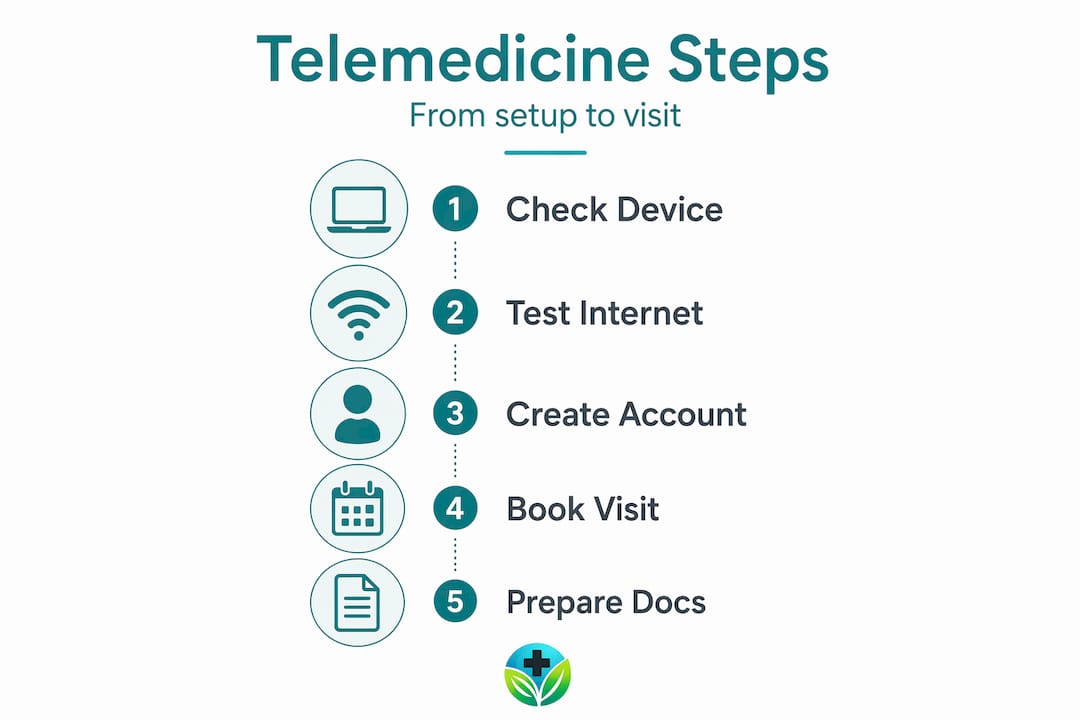
Each provider or telehealth platform uses its own software, whether that is a dedicated app like a patient portal, a video platform, or a secure browser-based link sent by email. Set up your account and download any required app at least 24 hours before your appointment. Log in once to confirm your username and password work, and test your camera and microphone within the platform itself.

Pro Tip: Run a full test of the telehealth platform 1 to 2 days before your appointment. If the platform fails on the day, having a direct phone number for your provider's office as a backup means you do not lose your appointment slot. This preparation step is the single most effective way to prevent technical failure during the visit.
Finding and scheduling telemedicine appointments
Once your technology is ready, the next step is locating the right provider and locking in an appointment.
Ways to find telemedicine providers
Finding telehealth providers starts with checking what your existing insurance already covers. Your insurer's website typically includes a provider directory where you can filter by "telehealth" or "virtual care" availability. Your primary care physician may also offer telemedicine directly through their patient portal, which keeps your care history in one place.
If you need a specialist or a dedicated telehealth platform, condition-specific services have expanded significantly. Platforms focused on mental health, dermatology, or weight management often have shorter wait times than general practices. When using any new platform, verify that the clinicians are licensed in your state. Telehealth regulations vary by location, and a provider must hold licensure where you reside to legally treat you.
Scheduling methods and what to expect
- Online patient portals: Fast, available 24 hours, but requires account setup and digital literacy. Best for existing patients.
- Provider's scheduling phone line: Slower but ideal for complex scheduling needs or when you have questions before booking.
- Telehealth platform apps: Often the quickest for new patients, with same-day or next-day availability in many cases.
- Insurance-provided telehealth lines: Convenient and usually low-cost, though limited to general care rather than specialty services.
When scheduling, have your insurance card, date of birth, current medication list, and the reason for your visit ready. Time zone differences matter if you are booking across state lines or with a national platform. Request a calendar invitation or set a reminder immediately so the appointment does not slip.
What to expect during your telemedicine visit
Understanding the format of a telemedicine visit removes a lot of the uncertainty that makes people hesitant.
How video and phone visits typically flow
A video visit usually begins with a check-in window, often 10 to 15 minutes before the appointment, where you confirm your identity and insurance. The clinician then joins, reviews your intake information, asks about your symptoms, and may visually assess what is visible on screen such as a skin condition or signs of respiratory distress. The visit typically closes with a treatment plan, prescriptions sent electronically to your pharmacy, and a follow-up recommendation.
Phone visits follow the same structure minus the visual component. They work well for medication refills, lab result reviews, and mental health check-ins.
Preparing your environment and documents
Telemedicine visits are protected by HIPAA, but patients should take their own steps to protect privacy. Choose a private room where others cannot overhear. Use earbuds or a headset. Make sure the lighting is in front of you, not behind you, so the clinician can see your face clearly.
Before the visit, gather:
- Your current medication list, including dosages
- A written summary of your symptoms and when they started
- Relevant prior test results or specialist notes
- Your pharmacy's name and phone number
- Your insurance card and member ID
Pro Tip: Write down your two or three most important questions before the visit begins. Telemedicine appointments are often shorter than in-person visits, and having your concerns prioritized in writing keeps the conversation focused and prevents you from leaving without answers.
Handling technical issues mid-visit is simpler than it seems. If your video freezes, switch to audio-only within the platform. If the platform drops entirely, call your provider's office directly on the backup number you saved during your test run.
Telemedicine insurance coverage and costs
Cost uncertainty is the most common reason adults delay or avoid using telemedicine services. The details here are worth understanding before your first visit.
Coverage parity vs. payment parity
Coverage parity means an insurer is required to cover telemedicine services. Payment parity means the insurer pays the same rate for a telehealth visit as it would for an identical in-person visit. These are legally distinct, and the difference directly affects your bill. A plan can cover telemedicine while paying providers significantly less, which sometimes results in higher patient cost-sharing depending on how the provider bills.
This distinction is the most common source of patient confusion about telehealth bills.
How coverage differs by insurance type
| Insurance type | Typical telehealth coverage | Key nuances |
|---|---|---|
| Private/employer plans | Usually covered; copay varies by plan | Check network status; out-of-network virtual providers can trigger surprise bills |
| Medicare | Broad coverage expanded through at least 2027 | Medicare reimbursement ranges from approximately $46 to over $230 per visit depending on service |
| Medicaid | Varies significantly by state | Confirm your state's telehealth policies before scheduling |
| No insurance | Out-of-pocket rates apply | Many platforms offer transparent flat-rate pricing for uninsured patients |
Medicare permanently removed geographic restrictions for behavioral health telehealth, and audio-only behavioral health visits from home remain covered through at least 2027 when video is not possible.
Always call your insurer before the visit. Ask specifically whether the provider is in-network, whether the service code for your concern is covered via telehealth, and what your expected copay or coinsurance will be. Document the name of the representative you spoke with and the date of the call.
Common challenges and how to resolve them
Even with good preparation, problems arise. Knowing the most common ones and their solutions keeps a minor issue from becoming a missed visit or an unexpected bill.
- Poor video connection: Lower your video quality setting within the app, close other browser tabs, and move closer to your router. If none of that helps, request an audio-only continuation.
- Platform login failure: Use the "forgot password" option first. If the platform is entirely down, call your provider directly using the backup number.
- Missed or delayed appointments: Contact the provider's office immediately. Many platforms allow rescheduling within the same day if you notify them promptly. Missed appointments without notice sometimes incur a fee.
- Insurance claim denial: Claim denials often result from "not medically necessary" determinations or coding errors. Save your explanation of benefits, review the denial reason, and appeal in writing with your clinical notes from the visit.
- Privacy concerns: If you cannot find a private space, reschedule rather than conducting the visit where others can overhear sensitive information.
- When telemedicine is not appropriate: Chest pain, difficulty breathing, suspected fractures, stroke symptoms, or any acute emergency require in-person or emergency care. Telemedicine cannot replace a physical exam when one is clinically necessary.
My take on telemedicine: what really makes it work
I've reviewed a significant amount of patient feedback and clinical guidance on accessing remote healthcare, and one pattern stands out consistently: the patients who get the most out of telemedicine are the ones who treat it like a real medical appointment rather than a casual video call.
That means writing down your questions, testing the technology, and following up. Telemedicine works best as part of a broader care plan, particularly for chronic condition management where regular touchpoints matter more than intermittent, exhaustive visits.
What I've also learned is that the insurance piece trips people up more than the technology does. I'd encourage anyone accessing remote healthcare for the first time to spend 15 minutes on the phone with their insurer before the visit. It removes the biggest source of post-visit frustration.
One caution worth voicing: telemedicine is a genuinely useful tool, but it does have real limits. Some conditions require hands-on examination that no camera can replace. Knowing when to request an in-person referral, and feeling comfortable asking for one, is part of using virtual care well rather than defaulting to it for everything.
— Raymond
How Renewmd supports your telemedicine wellness care
If your health goals include medically supervised weight management, Renewmd offers a fully integrated telemedicine experience designed to remove the friction most patients encounter. From your first clinical intake to medication delivery and ongoing coaching, every step happens through a structured digital process with licensed U.S. clinicians. There are no hidden fees and no complicated billing cycles.
Renewmd's online weight loss process walks you through exactly what to expect at each stage, making it straightforward to prepare for your first consultation. For those exploring GLP-1 receptor agonist therapies such as Semaglutide or Tirzepatide, Renewmd also provides clear educational resources on GLP-1 options and care, including how to approach treatment with a calm, evidence-based mindset. Ready to take the first step? Visit renewmd.clinic/start to begin.
FAQ
What do I need for a telemedicine appointment?
You need a device with a camera and microphone, such as a smartphone, tablet, or computer, and a stable internet connection. Audio-only phone visits are available for certain services if video access is not possible.
Does insurance cover telemedicine visits?
Most private plans, Medicare, and Medicaid cover telemedicine to some degree, but coverage and cost-sharing vary widely. Always verify your specific plan's telehealth benefits and provider network status before your appointment.
How do I prepare for a telemedicine visit?
Gather your medication list, insurance card, and a written summary of your symptoms before the visit. Choose a private, well-lit space, test your platform in advance, and have a backup phone number for your provider in case of technical issues.
What should I do if my insurance denies a telehealth claim?
Review the denial reason on your explanation of benefits, then appeal in writing with documentation from your visit. Coding errors and "not medically necessary" determinations are the most common causes, and diligent follow-up typically resolves them.
When is telemedicine not appropriate?
Telemedicine is not appropriate for emergencies, acute physical symptoms like chest pain or difficulty breathing, or any condition requiring a hands-on physical examination. In those cases, seek in-person or emergency care promptly.